5 Settings to Get Your Article Read — Done in 5 Minutes Before You Publish
Thumbnail · Title · Category · Tags · Excerpt
機械翻訳 / Machine-translated
2026年8月4日・9分で読める

Thumbnail · Title · Category · Tags · Excerpt
機械翻訳 / Machine-translated
Even with the same content, the number of readers can change depending on your settings. And the points that make a difference are pretty much fixed. Here, we'll cover only what you can do in 5 minutes before you hit publish.
The decision to read or not starts with the thumbnail. You can set an image up to 5 MB.
One useful thing to know: if you don't specify a thumbnail, the first image in your article body is used automatically.
That means you have three options:
There's almost no reason to choose option 3. Even for a text-only article, creating a single image with your title makes a noticeable difference in how it stands out in a list.
Your title can be up to 100 characters. However, in lists and social media previews, it gets cut off partway through.
Here's a practical guideline:
Titles that end with "about " or " summary" don't convey what's inside. State what the article covers right from the start.
You choose one category from 12 options.
AI & Technology / Business & Economy / Society & News / Entertainment / Lifestyle / Career & Work Style / Education & Learning / Creative & Fiction Writing / Novels & Stories / Essays & Thoughts / Development & Engineering / Other
Since you can only pick one, if you're unsure, ask yourself: "Which shelf would someone looking for this article go to?" Match the way readers search, not how you feel as a writer.
"Other" is a last resort. Putting your article there nearly eliminates the chance of it being discovered through categories.

① is the article's category. The one you choose will appear in one of these columns.
You can add up to 10 tags, but adding all 10 is counterproductive.
Tags indicate what your article is about. With 10 tags lined up, it becomes unclear which one is central. Narrow it down to 3–5 and stick to the core concepts of the article.
The excerpt can be up to 300 characters. It's used in list cards and as the description when shared on social media.
If you don't specify one, it's auto-generated from the beginning of your article — but auto-generated excerpts tend to be sentences that cut off mid-introduction. Writing this by hand makes a clear difference in how compelling your article looks in a list.
Write the excerpt not as a summary, but as "what the reader will gain by reading."
Rather than continuing to publish standalone articles, organizing them into a series gets more reads. The reason is simple: someone who reads one article can easily find the next.
When you create a series:
If you plan to write three or more articles on the same theme, we recommend setting up a series from the start. You can also reorganize them into a series later.
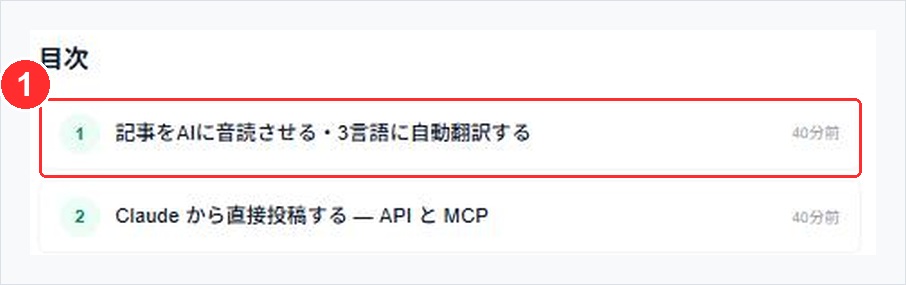
Creating a series generates a table of contents. ① is Episode 1. Readers who arrive partway through can still navigate back to the beginning.
You can set an SEO title and meta description separately. However, you only need to touch these when the article title and the keywords people search for don't match.
For example, if an article titled "What Was Decided in That Conference Room That Day" is actually about how to run 1-on-1 meetings, put the latter in the SEO title. In any other case, using your regular title as-is is perfectly fine.
What to do in the 5 minutes before you publish:
All of this takes 5 minutes. If you spent hours writing the article, these 5 minutes will absolutely pay off.
Next time, we'll talk about monetization — breaking down the differences between paid articles, tips, subscriptions, and membership communities.