Post Directly from Claude — API and MCP
Write, publish, and translate without opening a browser
機械翻訳 / Machine-translated
2026年8月4日・8分で読める

Write, publish, and translate without opening a browser
機械翻訳 / Machine-translated
MiraiPage can be operated without ever opening a browser. It has a REST API, and a MCP server is built directly into the platform, so you can ask an AI agent like Claude Code to "write an article and publish it" directly. Setup takes about three minutes.
API access is a Premium plan feature. It is not available on Free or Pro plans.
Issue a token from the "API Token" section in your settings screen. Give it a name and create it — the raw token string will be displayed once, right there and then.
It will never be shown again. Only a hash is stored on the server side, so there is no way for us to recover it. Be sure to copy it immediately and save it somewhere like a password manager.
You can hold up to 10 tokens per account. The safe approach is to issue separate tokens for each use case and revoke them when they are no longer needed. You can also set an expiration date.
curl https://www.miraipage.net/api/v1/me \
  -H "Authorization: Bearer your-token"
If your username and plan are returned, you're good to go.
curl -X POST https://www.miraipage.net/api/v1/posts \
  -H "Authorization: Bearer your-token" \
  -H "Content-Type: application/json" \
  -d '{
    "title": "APIから投稿してみた",
    "content": "## 見出し\n\n本文です。",
    "status": "draft",
    "category": "development",
    "tags": ["API"]
  }'
Setting status to draft creates it as a draft, so you can test freely. Set it to published when you're ready to go live.
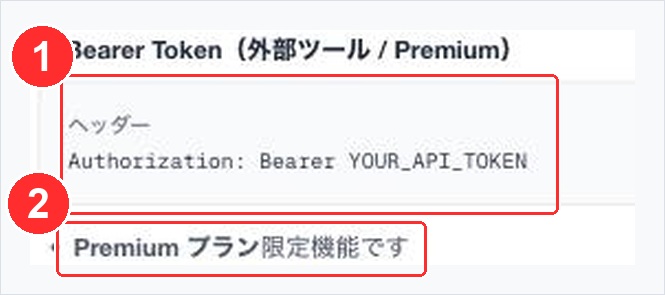
The authentication section of the API documentation. ① is the header to include in your request, ② is the required plan.
Now for the real thing. MiraiPage has an HTTP-based MCP server built in. The endpoint is https://www.miraipage.net/api/mcp.
There is no need to run a separate server or install an npm package.
claude mcp add -t http miraipage "https://www.miraipage.net/api/mcp" \
  -H "Authorization: Bearer your-token"
If you want to use it across all projects rather than just the current one, add -s user.
claude mcp add -s user -t http miraipage "https://www.miraipage.net/api/mcp" \
  -H "Authorization: Bearer your-token"
You can also write it directly into the config file.
{
  "mcpServers": {
    "miraipage": {
      "url": "https://www.miraipage.net/api/mcp",
      "headers": {
        "Authorization": "Bearer your-token"
      }
    }
  }
}
Once registered, 43 tools become available. Here are the main ones:
Once registered, you can simply ask in natural language.
"Turn these research findings into an article and save it as a draft."
"Translate that last article into English."
"Replace just the third slide."
The agent selects and executes the appropriate tool. Because you can turn local files or terminal output directly into articles, using your work log as-is to create an article becomes a realistic workflow.
status: "draft" and visually verify the results before switching to published.MiraiPage can send Webhooks when articles are created, updated, published, unpublished, or deleted.
You can set up integrations like receiving post.published and pushing it to social media, or sending a notification to an internal chat. Write with MCP, distribute with Webhooks — this automates both ends of your publishing workflow.
Next time, we'll introduce every AI command built into the Salon chat.